
All case studies

Maritime services & crew management

One connected view of seafarer applications, records and crew movements.

Built for ACME International Shipping (Pvt) Ltd, the system connects seafarer applications and records with the day-to-day work of managing vessels, clients and crew movements.

  • Crew management
  • Seafarer records
  • Online applications
  • Document workflows
ACME International Shipping system dashboard

Overview

What we built.

Founded by active Master Mariners and Chief Engineers, ACME provides maritime services and crew management. We developed a system that gives its team a central workspace for seafarer information, vessel and client records, application documents and crew movements.

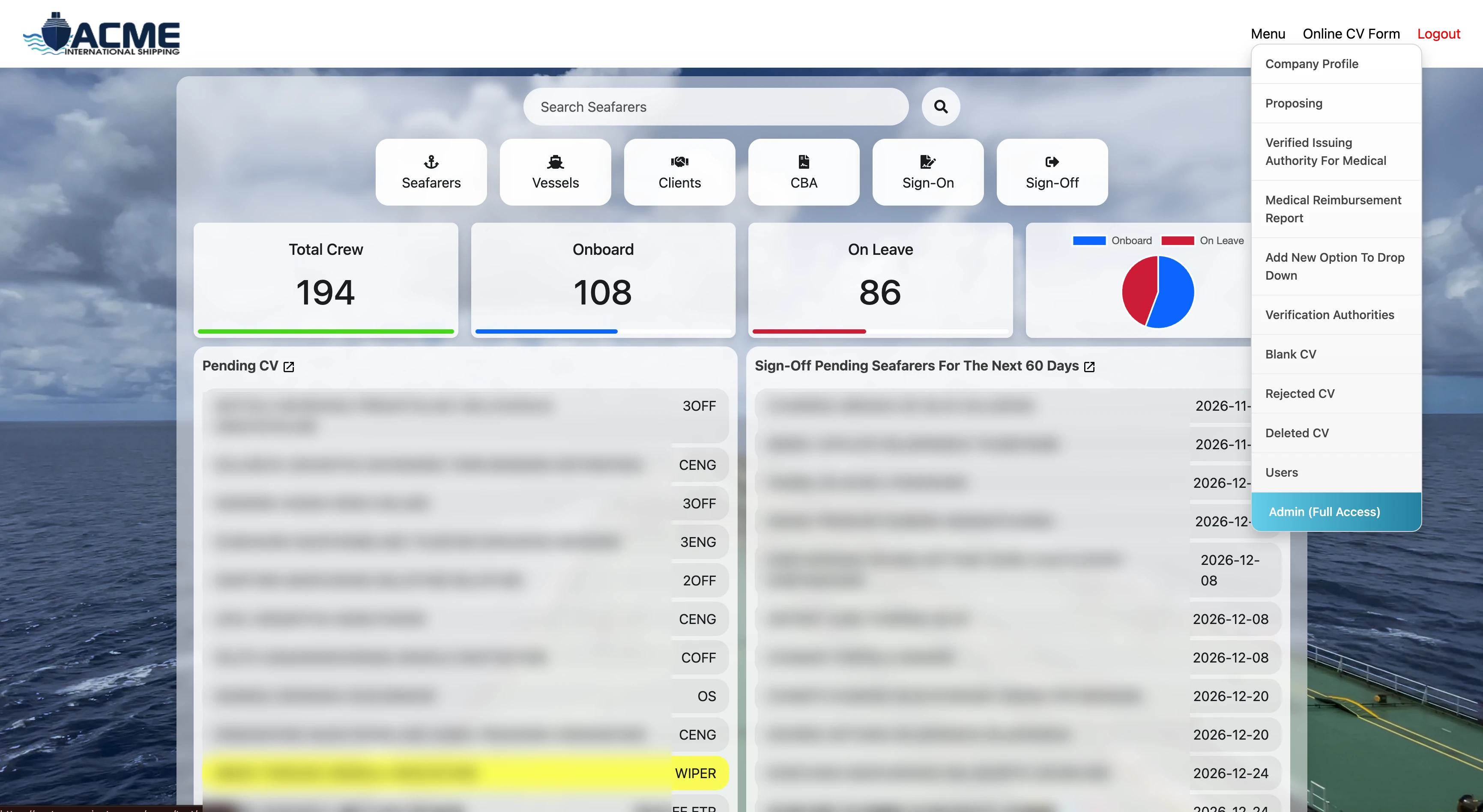
The dashboard brings key crew counts and upcoming work into view, while the online CV form collects the personal, professional, travel, medical and service information needed to assess a seafarer’s profile.

The challenge

Many details, one seafarer record.

Crew records span personal and next-of-kin details, ranks and availability, sea service, qualifications, certificates, medical information and travel documents. Keeping these details together makes it easier for the team to review a candidate’s profile and follow up on supporting records.

The system brings those records alongside the operational areas visible in the dashboard: seafarers, vessels, clients, CBA, sign-on and sign-off. Summary panels highlight onboard and on-leave counts, pending CVs and sign-offs coming up in the next 60 days.

How it works

From an online application to crew movement.

The screens connect candidate information and document handling with the operational modules used to manage vessels and crew.

01

See the fleet and crew at a glance

The home dashboard provides seafarer search and shortcuts to Seafarers, Vessels, Clients, CBA, Sign-On and Sign-Off. It also summarizes total crew, onboard crew, crew on leave, pending CVs and sign-offs due within 60 days.

  • Search seafarer records
  • Open core crew and vessel modules
  • Review onboard and on-leave counts
  • Spot pending CVs and upcoming sign-offs
02

Collect applications through the online CV form

The multi-section form captures personal details and next of kin, travel documents, STCW and other certificates, sea experience, medical details and additional remarks. Applicants can add the supporting information required for a maritime crew profile.

  • Personal details and next of kin
  • Travel documents and visa information
  • STCW, certificates and sea experience
  • Medical, other documents and remarks
03

Review a seafarer’s profile and documents

The seafarer record brings rank, availability, vessel category, profile details and uploaded documents into a single view. Staff can open the CV, download a version without contact details, access bank details and download the profile photo from the record actions shown.

  • Review rank, availability and profile details
  • Access uploaded travel and qualification records
  • Download CV and redacted-contact CV versions
  • Manage the record’s active status
04

Upload and manage supporting documents

The document list shown in the system lets staff choose a file, review the document name and upload date, open a file with View Doc, or remove it. The travel-document section also provides fields for document number, country, issue and expiry dates, issuing authority and place of issue.

  • Choose and upload a document
  • View stored files and upload dates
  • Remove an uploaded file
  • Record passport and travel-document details
05

Track sign-on and sign-off work

Dedicated Sign-On and Sign-Off options support the crew movement workflow. Dashboard panels surface onboard and on-leave totals and sign-off cases expected within the next 60 days for follow-up.

  • Open separate sign-on and sign-off areas
  • See onboard and on-leave crew totals
  • Review upcoming sign-offs

Administration

Configuration and review tools for the team.

The administration menu groups company setup, reference data, document review and user access options.

Company and operational setup

The administration menu includes Company Profile and Proposing, plus a control for adding options to dropdown lists. These options let the team maintain company information and extend selectable reference values used in the system.

Verification, document status and access

The available options include medical issuing-authority verification, Verification Authorities, Medical Reimbursement Report, and lists for Blank CV, Rejected CV and Deleted CV records. User management and an Admin (Full Access) role are also visible in the menu.

Seafarer application

A structured application for a maritime career.

The application form organizes personal and family details, medical and travel information, maritime certifications, specialist training, sea service, references and the final interview record.

Personal & family details
Medical & travel documents
Certifications & licenses
Training & endorsements
Additional experience & references
Declaration & interview

The result

A practical workspace for crew management.

01

Connected operational areas

Seafarers, vessels, clients, CBA and crew movements are available from the same dashboard.

02

More complete candidate profiles

The online form organizes personal, family, travel, training, medical and sea-service information.

03

Clear document review actions

CVs and supporting records can be reviewed with the download and status options shown in the system.

04

Useful follow-up visibility

Pending CVs, crew status totals and upcoming sign-offs are surfaced for the team.

Want software built around your business?

Tell us how your team works today and we will talk through what could work better.